Every software team has experienced this moment. A critical bug is reported in production. A developer opens the relevant file. And immediately confronts the question that haunts every software project that has evolved beyond its original architecture: "How on earth does this actually work?"
Legacy code without documentation. Millions of lines inherited from developers who left years ago. Functions that call functions that call functions with no obvious entry point. Developers consistently report spending more time reading and tracing existing code than writing new code, and in organisations with large legacy codebases that burden is even greater.
Understand by SciTools was built specifically for this problem. It turns your codebase from a black box into a transparent, navigable architecture - letting developers understand what code does, how it connects, and what will break when they change it.
The Real Cost of Poor Code Comprehension
Poor code comprehension isn't an inconvenience - it has measurable, expensive consequences:
- Onboarding delays: New developers can take a long time to become productive in a complex legacy codebase without a way to see how it is structured and how its parts depend on one another.
- Regression bugs: Changes with unexpected side effects are far costlier to fix once they reach production. Understand's dependency graphs show what a change will affect before it is made.
- Security vulnerabilities in legacy code: Undocumented code paths are where security vulnerabilities hide - functions nobody knows about, with inputs nobody sanitises.
- Failed refactors: Architectural improvements abandoned because nobody could confidently trace all the dependencies they'd need to restructure.
Example: When a team needs to upgrade a C++ module in an older automotive codebase, a dependency analysis and call graph let them trace callers and callees without searching the source by hand, so they can scope the change, estimate effort and assess risk before writing code.
What Understand Does - Core Capabilities
Instant Architecture Visualisation
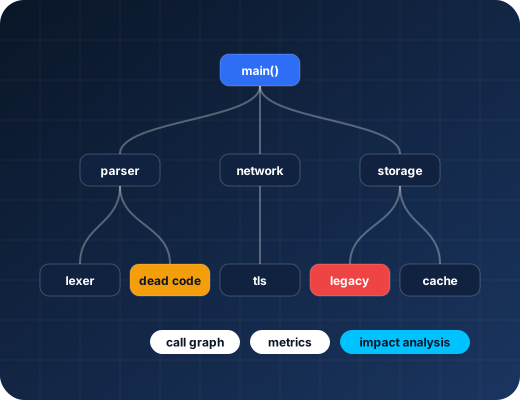
Understand parses your codebase, from a small utility to a large legacy system, and builds a navigable model of your software architecture. You get call graphs, dependency graphs and UML class diagrams that show how your code is structured. Not documentation someone wrote three years ago. The actual, current state of your code.
// Find all functions that depend on: can_transmit_frame()
Direct callers: 14 functions
├─ adas_controller.c:247 send_emergency_brake()
├─ comms_layer.c:891 broadcast_vehicle_state()
├─ diagnostic_mgr.c:134 send_dtc_report()
└─ ... +11 more
Transitive callers: 68 functions across 12 files
// Impact of changing can_transmit_frame() signature:
// 68 potential call sites require review
Code Metrics That Tell You Where the Risk Is
Understand calculates over 270 code metrics - cyclomatic complexity, coupling between objects, depth of inheritance, lines of code per function, comment density, and many more. These metrics are your risk map. A function with a cyclomatic complexity of 80 is a function that is virtually untestable, almost certainly has bugs, and will be a maintenance nightmare. Understand surfaces these issues across your entire codebase, letting you prioritise refactoring effort where it will have the highest impact.
# Project: industrial_control_system | Date: 2026-06-01
HIGH COMPLEXITY FUNCTIONS (Cyclomatic Complexity > 30):
sensor_data_processor() CC=94 Lines=847 CRITICAL RISK
comms_state_machine() CC=67 Lines=534 HIGH RISK
config_parser_v2() CC=52 Lines=421 HIGH RISK
COUPLING VIOLATIONS (Fan-out > 20):
main_controller.c Fan-out=34 modules REFACTOR REQUIRED
UNDOCUMENTED FUNCTIONS: 1,247 of 3,891 (32%) have no comments
DEAD CODE: 89 functions identified as unreachable
Cross-Language Support - One Tool for Your Whole Stack
Understand supports C, C++, Java, Python, Ada, FORTRAN, JOVIAL, JavaScript, TypeScript, PHP, C#, VHDL, and more. In mixed-language environments - common in automotive, aerospace, and enterprise systems - Understand gives you a unified view of the entire codebase rather than forcing you to switch between multiple tools.
Automated Code Documentation
Understand automatically generates documentation from your source code - entity descriptions, call relationships, file dependencies, metric summaries. For teams inheriting legacy code with no documentation, this is transformational. You go from "we don't know what this does" to "here's the auto-generated architecture document" in the time it takes to run the analysis.
🔒 Try Understand by SciTools Free for 14 Days
Point Understand at your codebase and get a complete architectural map, code metrics report, and dependency analysis in your first session. Expert onboarding from our team included.
Start My Free 14-Day Understand Trial →Get a 14-day free trial with expert onboarding from SecOpsTool, or compare it with the alternatives first.
Security Use Case: Finding Hidden Attack Surface in Legacy Code
Understand's data-flow and dependency graphs can also support security-focused review of legacy applications: tracing how data moves through the code, finding where external input enters the system, and locating unused or dead code paths that a manual review might miss. In many legacy C/C++ codebases, the functions nobody remembers are exactly the ones that need a closer look.
Who Uses Understand?
Understand is particularly valuable for teams working with large-scale embedded C/C++ (automotive, aerospace, industrial, defence), inherited enterprise Java applications, safety-critical systems requiring code comprehension as part of certification, security teams performing architectural risk assessments, and engineering managers who need objective metrics to assess technical debt and refactoring ROI.
The single biggest barrier to moving fast in software development isn't writing speed - it's understanding speed. Developers who understand their codebase make better decisions, introduce fewer bugs, and deliver changes faster. Understand by SciTools eliminates the biggest bottleneck in complex software development - the black box problem - and turns your codebase into your most powerful development tool.
Sources
Primary documents this article is based on. Product statements and regulatory clauses above were checked against these pages.
- Understand by SciTools - homepage
- Understand - Features
- Understand - Supported Languages
- Understand - Graphs
- Metrics Overview (Understand Documentation)
- Find unused / dead / extraneous code (Understand Documentation)
- CodeCheck
- CodeCheck standards & rule coverage (Understand Documentation)
- Understand AI (SciTools Support)
- Combined Language Analysis (SciTools Support)